Unlock Professional Jewelry Design with the Ornate Earring SVG Bundle
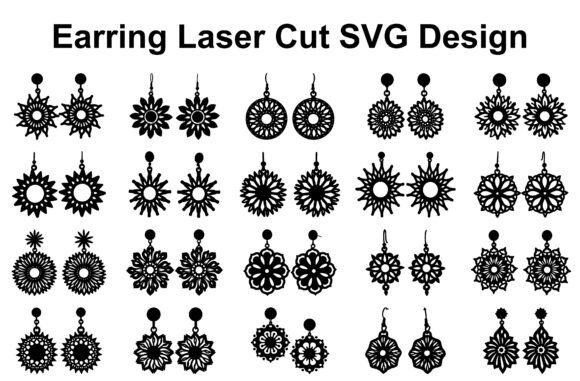
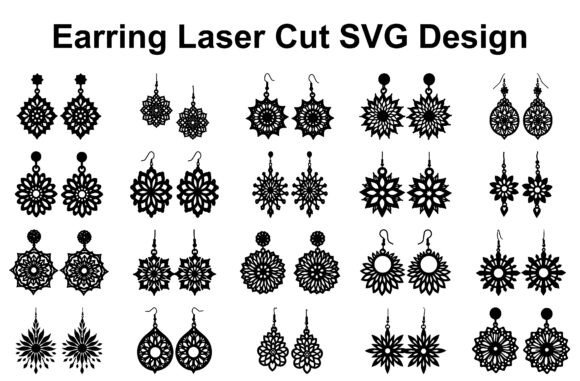
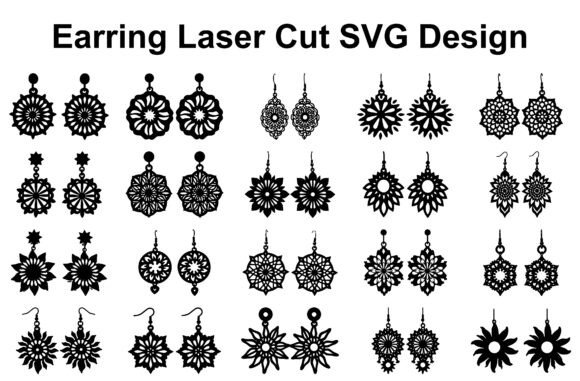
The surge in handmade jewelry has transformed a simple hobby into a thriving marketplace for creators everywhere. Whether you are an Etsy seller looking to expand your inventory or a crafting enthusiast eager to try laser cutting, the quality of your digital assets dictates the quality of your final product. This is where the Ornate Earring SVG Bundle becomes an essential tool. Featuring 20 distinct designs ranging from elegant floral patterns and decorative mandalas to sunburst motifs and lace-inspired artwork, this collection offers a shortcut to professional-grade results. However, possessing high-quality files is only half the battle; understanding how to select materials, configure machine settings, and avoid common production pitfalls is what separates amateur attempts from sellable art.
Understanding the Value of Vector Precision
Many beginners make the critical mistake of assuming all image files are created equal when it comes to fabrication. A common misunderstanding is attempting to use raster images (like standard JPEGs found on social media) for laser cutting or plotting. Raster images are made of pixels, which become jagged and unclear when scaled up, leading to rough edges and failed cuts. The Ornate Earring SVG Bundle solves this by providing scalable vector files in formats like SVG, EPS, and AI. Unlike pixels, vectors use mathematical paths to define shapes, ensuring that every intricate geometric element and delicate lace detail remains crisp whether you are making a tiny stud or a large statement piece.
When you download this bundle, you receive not just SVGs, but also EPS, AI, PDF, PNG, and JPG files. While the versatility is excellent, do not overlook the specific file type required by your workflow. For laser cutting software like LightBurn or Glowforge, the SVG or DXF (converted from SVG) is usually ideal because it preserves cut lines. If you are using a Cricut or Silhouette Cameo for vinyl stencils or heat transfer, the SVG ensures clean weed lines. Using the wrong format can lead to wasted material and frustration, so always verify compatibility with your specific machine before starting your project.
Avoiding Material and Machine Mismatches
One of the most frequent errors creators make is mismatching the complexity of the design with the wrong material. The ornate nature of these earrings, with their fine floral patterns and interconnected mandala pieces, demands materials that can hold detail without fracturing. A common poor decision is using low-quality wood veneers or brittle acrylics that chip easily under the laser. When working with the intricate elements in this bundle, opt for high-grade birch plywood, cast acrylic, or supple leather. These materials respond better to the precision required by the detailed cut paths.
Furthermore, many users fail to adjust their machine settings for the density of the design. An earring design packed with lace-inspired artwork requires a different power and speed setting than a solid geometric shape. If you run the laser too fast to save time, you risk incomplete cuts that leave your earrings hanging together by thin threads of material. Conversely, too much power can burn the edges, ruining the aesthetic of light-colored woods or clear acrylics. Always perform a test cut on a scrap piece of your chosen material. This small step saves money on ruined batches and ensures the professional-quality detail promised by the bundle is actually achieved.
Optimizing for Assembly and Wearability
Designing for aesthetics is vital, but designing for function is what makes jewelry sellable. A significant oversight among new jewelry makers is neglecting the structural integrity of the earring during the design phase. While the Ornate Earring SVG Bundle provides beautiful visuals, you must consider how the pieces will be assembled. Delicate protrusions in sunburst motifs or thin connectors in geometric designs can snap if not supported properly or if the material grain runs against the stress point.
To avoid this, analyze the orientation of your design relative to the material grain before cutting. For wooden earrings, aligning the longest part of the earring parallel to the wood grain increases strength. Additionally, consider the weight of the final product. Intricate designs in thick MDF or heavy hardwood can become uncomfortable to wear. A better approach is to use lighter materials like 3mm birch or acrylic for larger statement pieces, reserving denser materials for smaller, stud-style designs included in the collection.
Maximizing Commercial Potential
For entrepreneurs and small business owners, the license terms of digital assets are paramount. A frequent misunderstanding involves the scope of "commercial use." While this bundle is suitable for commercial projects, relying solely on the default files without customization can lead to a saturated market where your products look identical to competitors'. To truly stand out, you should leverage the editable nature of the AI and EPS files. Change the scale, combine elements from different designs within the 20-file set, or add personalized engraving details.
Another area where creators lose efficiency is in their finishing process. The raw cut from a laser often leaves behind soot marks or slight discoloration. Ignoring the post-processing stage is a missed opportunity to elevate the perceived value of your jewelry. Sanding wooden edges lightly, polishing acrylic to restore clarity, or sealing leather can transform a good product into a premium one. The time invested in finishing directly correlates to the price point you can command in the marketplace.
- Check File Integrity: Before cutting, open the SVG in your software to ensure all paths are closed and there are no stray points that could cause the laser to jump unexpectedly.
- Material Testing: Never run a full sheet of expensive material without testing power and speed settings on a scrap first.
- Grain Direction: Always align intricate cuts with the material grain to prevent breakage during wear.
- Post-Processing: Budget time for sanding, polishing, or sealing to enhance the final look and durability.
- Customization: Modify the vector nodes to create unique variations, ensuring your brand identity remains distinct.
In conclusion, the Ornate Earring SVG Bundle offers a robust foundation for creating stunning handmade jewelry, but the final outcome depends heavily on your execution. By respecting the capabilities of vector files, choosing appropriate materials, adjusting machine parameters with care, and focusing on structural durability, you can avoid the common traps that hinder many crafters. Whether you are using a Glowforge, xTool, or a desktop cutter, these 20 designs provide the flexibility needed to produce high-quality, market-ready earrings. Approach your projects with patience and attention to detail, and you will find that these tools not only streamline your workflow but also significantly enhance the quality of your creative output.